
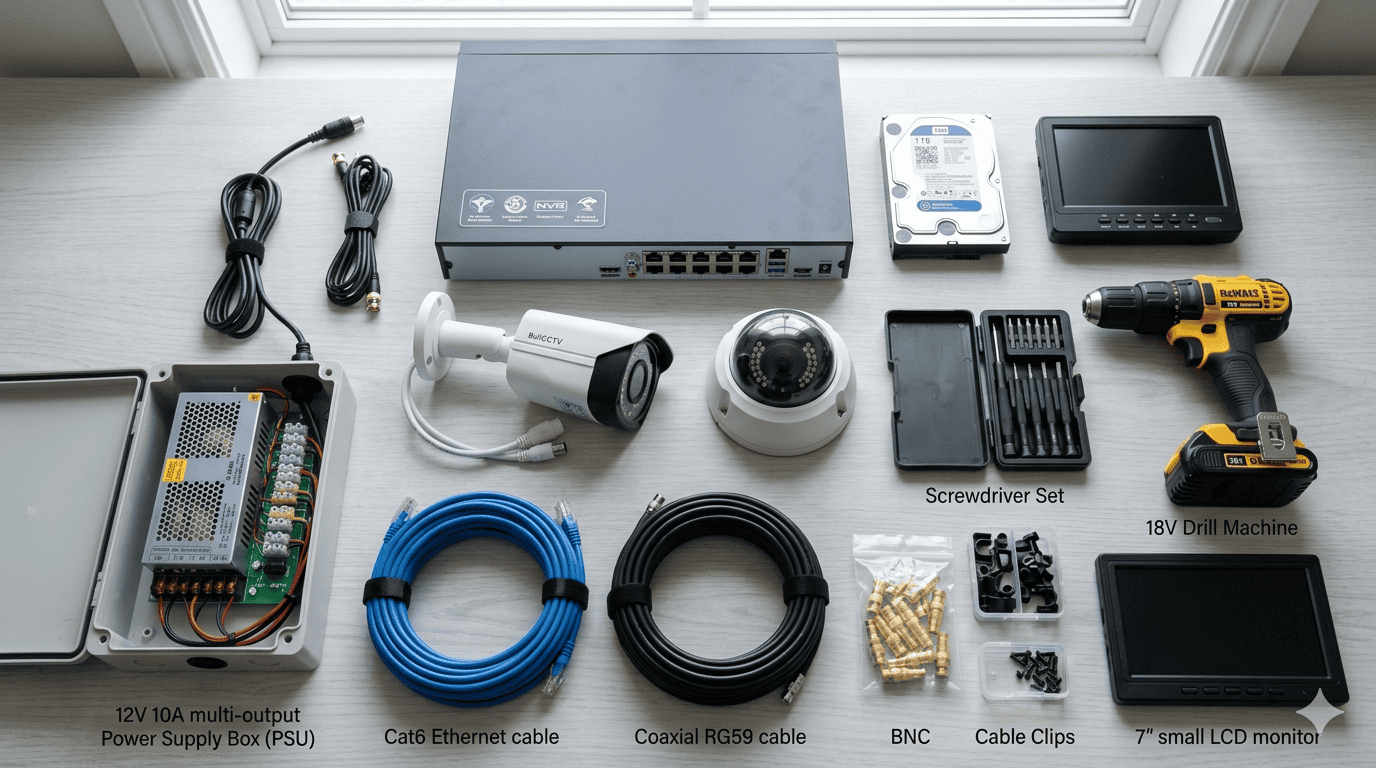
Materials Needed for CCTV Installation: The Complete Kenyan Checklist
Whether you’re planning a professional installation or just want to understand what goes into a CCTV system before calling a technician, this guide covers every component — from the obvious ones like cameras and cables, to the small accessories that installers often forget to mention until they’re standing in your house asking for more money.
Quick Materials Checklist
Before going into detail on each item, here’s the master checklist of everything a complete CCTV installation requires. Use this to evaluate any quote you receive — if a supplier’s list is missing items marked Required, that’s a red flag.
| Material | Status | Approx. Cost (KES) | Notes |
|---|---|---|---|
| CCTV Cameras | Required | 2,500 – 20,000 each | Per camera depending on type and resolution |
| DVR or NVR | Required | 7,000 – 30,000 | Analog → DVR, IP → NVR |
| Surveillance Hard Drive | Required | 7,000 – 18,000 | 1TB to 4TB, must be 24/7 rated |
| Siamese / Cat6 Cable | Required | 1,500 – 5,000 | Per 100m roll |
| BNC or RJ45 Connectors | Required | 500 – 2,000 | Per pack |
| Power Supply Unit (PSU) | Required | 1,500 – 4,000 | Centralized 12V DC board preferred |
| PVC Conduit / Cable Trunking | Required | 1,000 – 4,000 | Outdoor cable protection |
| Camera Mounting Brackets | Required | Usually included with camera | Wall or ceiling mount |
| Wall Plugs and Rawl Bolts | Required | 200 – 500 | For concrete/masonry walls |
| HDMI Cable | Required | 500 – 1,500 | DVR/NVR to monitor connection |
| Monitor or TV | Required | 8,000 – 18,000 | Often excluded from quotes |
| UPS / Power Backup | Recommended | 7,000 – 20,000 | Critical in Kenya’s power environment |
| PoE Switch (IP systems) | If IP cameras | 4,000 – 15,000 | Only needed if NVR has no built-in PoE |
| Router (for remote viewing) | Recommended | 2,500 – 8,000 | Required for phone app access |
| Waterproof Junction Boxes | Recommended | 300 – 800 each | For outdoor cable connections |
| Cable Ties and Clips | Recommended | 200 – 600 | Neat cable routing |
1. CCTV Cameras
This one’s obvious, but the type of camera you choose determines nearly everything else on this list — the cable type, the recording unit, the storage requirements, and ultimately how useful the footage is when you actually need it.
In Kenya’s security market, you’ll mostly encounter four camera types:
For most Kenyan homes and small businesses, 2MP (1080p) cameras hit the sweet spot between cost and image quality. If you need to identify faces or number plates from a distance — at a gate or car park — go 4MP or higher.
Stick to Hikvision, EZVIZ, or Dahua. These brands have authorised distributors in Kenya, genuine warranties, and long-term firmware support. Unbranded cameras from unknown suppliers might save you KES 500 per unit upfront but have no warranty path and often fail within 18 months.
2. DVR or NVR — The Brain of the System
Every camera needs somewhere to send its footage. That’s the job of the recording unit. Which one you need depends entirely on the type of cameras you’re installing:
DVR (Digital Video Recorder)
Used with analog cameras. Receives video signal over coaxial (Siamese) cable. DVRs are simpler, cheaper, and still perfectly capable for standard home installations. A 4-channel DVR starts around KES 7,000, an 8-channel around KES 10,000–15,000.
NVR (Network Video Recorder)
Used with IP cameras. Receives footage over Cat6 ethernet cable or wirelessly. NVRs offer more advanced features — better remote access, smarter motion detection, and easier scalability. A 4-channel NVR starts around KES 12,000, with 8-channel units from KES 18,000.
When buying, confirm the channel count matches your camera count — and ideally, buy a unit with 2–4 extra channels to accommodate future expansion without replacing the entire recorder.
| Channel Count | DVR Price (KES) | NVR Price (KES) | Best For |
|---|---|---|---|
| 4-Channel | 7,000 – 10,000 | 12,000 – 18,000 | Small home, kiosk, apartment |
| 8-Channel | 10,000 – 16,000 | 18,000 – 28,000 | Large home, SME, warehouse |
| 16-Channel | 18,000 – 30,000 | 28,000 – 55,000 | Commercial premises, apartment blocks |
Buying a 4-channel DVR when you have 4 cameras gives you zero room to grow. Always buy at least one channel tier up — the price difference is small and it saves you replacing the whole unit when you want to add a camera later.
3. Surveillance Hard Drive (HDD)
A CCTV system without a hard drive is literally just a camera — there’s nowhere to record footage. The hard drive is where all recordings are stored, and it’s one of the components that gets the most abuse. Standard desktop hard drives are not built for 24/7 continuous write cycles. Under CCTV recording conditions, a desktop drive will typically fail within 6–12 months.
You need a surveillance-grade HDD. In Kenya, the two dominant options are the Western Digital Purple series and the Seagate SkyHawk series. Both are rated for continuous recording and handle the constant read/write demands of CCTV systems. They’re stocked by most reputable security suppliers in Nairobi.
| HDD Capacity | Price Range (KES) | Recording Duration (4 cams @ 1080p) |
|---|---|---|
| 1TB | 7,000 – 9,500 | ~7–10 days continuous |
| 2TB | 10,000 – 14,000 | ~14–20 days continuous |
| 4TB | 16,000 – 22,000 | ~30+ days continuous |
For most homes, 1TB is sufficient. For businesses — especially ones where disputes, theft claims, or incidents may require footage older than a week — 2TB is the minimum worth installing. The DVR/NVR overwrites the oldest footage automatically once full, so you’re never manually managing storage.
Never let an installer put a desktop-grade drive (standard WD Blue, Seagate Barracuda, etc.) in your CCTV system. It will fail quickly and quietly — usually during a power cut — and you’ll discover the loss only after an incident when you need the footage most.
4. Cables — The Most Underrated Component
If there’s one place where most cheap CCTV installations cut corners, it’s the cable. Poor-quality cable is the single most common cause of signal loss, image degradation, and system failure in Kenya’s climate. Hot sun bakes unprotected outdoor runs, UV radiation cracks the insulation, and heavy rains find their way into any weakness in the sheathing.
RG59 Siamese Cable (Analog Systems)
The standard for analog CCTV installations. Siamese cable combines a coaxial video cable and a 2-core power cable in a single sheath — one run handles both signal and power to the camera. It’s sold in rolls of 100m and 305m. A quality 100m roll costs between KES 1,500 and KES 3,500. Don’t buy the cheapest roll on the shelf — thin copper conductors and poor shielding cause signal interference, especially over longer runs.
Cat6 Cable (IP Systems)
IP camera installations use Cat6 ethernet cable. Unlike Siamese cable, Cat6 carries both data and power (via PoE) in a single run without a separate power cable. A 100m roll of decent Cat6 costs KES 2,000–4,500. For outdoor runs, use outdoor-rated Cat6 with UV-resistant jacket and a gel-filled core that resists moisture.
“The camera is what you see on the invoice. The cable is what determines whether it still works in two years.”
How Much Cable Do You Need?
A general rule: measure the actual cable run distance from each camera to the DVR/NVR — don’t just measure the straight-line distance. Cables follow walls, ceilings, and conduit paths. Add 15–20% to your measurement for slack and routing allowance. For a typical 4-camera home installation, 50–80m of cable is usually adequate. A business installation with cameras spread across a compound might need 200–300m.
5. Connectors and Terminators
Cables don’t magically plug into cameras and DVRs — they need the right connectors crimped or fitted at each end. These small parts are often bundled with camera kits but worth knowing about if you’re buying components separately.
BNC Connectors (Analog)
The twist-lock connectors used at both ends of a coaxial cable run. They connect to the camera’s video output and the DVR’s video input. They come in compression-type (more reliable, needs a crimping tool) and twist-on type (easier to fit, slightly less secure). A pack of 20 compression BNC connectors costs around KES 300–600.
DC Power Connectors
The barrel-style power connectors (female on the camera side, male on the PSU side) that complete the power circuit for each camera in an analog system. Usually sold alongside BNC connectors. Buy extras — they’re cheap and easy to lose.
RJ45 Connectors (IP Systems)
The standard ethernet connectors for Cat6 cable. If your installer is terminating Cat6 cable on site rather than running pre-made patch cables, they’ll need RJ45 connectors and a proper crimping tool to do it cleanly. A pack of 50 connectors costs KES 300–700.
Video Baluns
These are adapters that allow you to run analog CCTV signals over Cat5/Cat6 cable instead of coaxial cable — useful when you already have Cat5 cabling in a building and want to avoid re-cabling. You need one balun at the camera end and one at the DVR end. They cost around KES 200–500 per pair.
6. Power Supply Unit (PSU)
Every camera needs 12V DC power. There are two ways to deliver it:
Individual Camera Adapters
Small plug-in adapters that power one camera each. These work but create a mess of plugs and extension leads, and if one adapter fails you lose that camera without knowing why. Common in cheap DIY installs.
Centralised Power Distribution Board
A single unit that takes mains power and distributes 12V DC to multiple cameras — 4, 8, or 16 outputs from one box. This is the professional approach. All power comes from one point, fused output per channel, and if something trips you know exactly where to look. A 4-output board costs around KES 1,200–2,000; an 8-output board around KES 1,800–3,500.
For IP/PoE systems, the NVR or PoE switch handles camera power over the ethernet cable — no separate PSU is needed per camera, which simplifies the installation significantly.
Always install the DVR/NVR and power supply in a secure, lockable location — a wall cabinet or server room if available. A thief who can reach the recorder can simply take it. Footage stored only on the local HDD is lost if the hardware walks out the door. Consider cloud backup or an off-site NAS for critical properties.
7. Conduit and Cable Trunking
In any professional CCTV installation, exposed cables are a liability. Kenya’s climate is harder on outdoor cabling than many people realise — intense UV radiation during dry season, heavy rains during long and short rains, and significant temperature swings between day and night all degrade unprotected cable insulation within 12–18 months.
PVC Conduit
Rigid or flexible PVC pipe used to route cables through walls, under slabs, or along outdoor surfaces where cable is exposed. Round conduit is used for runs that go underground or through concrete. The conduit itself costs very little — KES 150–400 per metre depending on diameter — but protecting your cable runs with it dramatically extends the life of the installation.
Rectangular Cable Trunking
Flat, snap-on plastic channel used for surface-mounted indoor cable runs — along walls and ceilings. Neater than bare cable, easy to access for maintenance, and protects against accidental damage. A 2-metre length costs KES 200–600 depending on width.
Spiral Cable Wrap
Flexible spiral wrap used to bundle and protect cables at junction points or where cables enter the back of a camera. Inexpensive and adds both protection and a professional look to the installation.
8. Mounting Hardware
Cameras are only as effective as their position. Mounting hardware is what locks each camera in place at the right angle — and in Kenya’s construction environment, that usually means drilling into concrete or hollow-core block walls.
Camera Brackets
Most cameras come with a bracket included. However, for unusual mounting surfaces — high ceilings, gate pillars, corner installations — you may need extended brackets or pole mounts. These typically cost KES 300–1,200 depending on type.
Wall Plugs (Rawl Plugs)
Essential for any concrete or masonry surface. Standard plastic wall plugs are fine for lighter cameras; for heavier PTZ units or cameras on high-vibration surfaces, use steel rawl bolts. Keep a variety of sizes on hand.
Self-Tapping Screws
Used for mounting brackets to lightweight materials or for secondary fixings. Stainless steel preferred for outdoor use to prevent rust staining on walls.
Cable Clips and Saddles
Used to fix cables to walls and ceilings between the camera and conduit entry points. They keep runs tidy and prevent the cable from hanging loosely where it can be pulled or damaged.
9. Monitor or Display Screen
The DVR or NVR connects to a screen via HDMI or VGA for live viewing and local playback. This is one of the most commonly excluded items in CCTV quotes — the system is delivered, installed, and fully wired, but nobody can actually watch the footage without a screen.
You don’t need anything special. Any TV or monitor with an HDMI input works perfectly. If you’re setting up a dedicated security room or guard station, a basic 21-inch monitor costs KES 8,000–13,000. If you just want to verify the system is working and then monitor it exclusively via phone app, your existing TV works for the initial setup.
For businesses with a reception desk or guard room, a dedicated monitor mounted at the workstation is worth the investment — it makes it easy for staff to check footage without pulling out a phone.
10. Networking Equipment (IP Systems)
If you’re installing IP cameras and want remote viewing on your phone — which is one of the main reasons people choose IP over analog — you need to connect the NVR to the internet. That involves a few additional components:
PoE Switch
If your NVR doesn’t have built-in PoE ports (many budget NVRs don’t), you’ll need a separate PoE switch. This is the device that powers your IP cameras through the Cat6 cable while simultaneously sending data back to the NVR. An 8-port PoE switch costs KES 4,000–12,000 depending on total power output.
Router
The NVR needs to connect to your home or business router to enable remote viewing via apps like Hik-Connect or EZVIZ. If you already have a router with a free ethernet port, this costs nothing extra. If you don’t have broadband internet on site and want remote access, you’ll need a router with a SIM card slot or a dedicated data connection.
Ethernet Patch Cables
Short, pre-made Cat6 cables used to connect the NVR to the router, or the PoE switch to the NVR. Usually 0.5m to 2m long. These cost KES 200–500 each and are often forgotten until the installer is on site with everything connected except the router link.
11. UPS — Uninterruptible Power Supply
Kenya experiences frequent power interruptions — from brief KPLC outages in urban estates to longer cuts in areas served by older infrastructure. A CCTV system that shuts off every time the power flickers is a serious security gap. More importantly, DVRs and NVRs that experience sudden power loss without a proper shutdown cycle are prone to hard drive corruption over time.
A UPS acts as a battery backup that keeps the DVR/NVR (and ideally the cameras) running during outages. It also conditions the power supply, protecting against voltage spikes that are common on Kenya’s grid — particularly during power restoration after an outage.
| UPS Capacity | Backup Duration (DVR + 4 cams) | Price (KES) |
|---|---|---|
| 600VA | ~30–45 minutes | 5,000 – 8,000 |
| 1000VA | ~45–90 minutes | 8,000 – 13,000 |
| 1500VA | ~90–150 minutes | 12,000 – 20,000 |
For a home installation, a 1000VA UPS is typically sufficient. For a business with more cameras and longer power cuts, size up accordingly. UPS batteries typically last 2–3 years before needing replacement — factor that into your long-term budget.
12. Installation Tools
This section is primarily relevant if you’re installing the system yourself. A professional installer will have all of this. If you’re attempting a DIY installation, here’s what the job genuinely requires — not just what YouTube tutorials mention:
- Power drill with masonry bits — Kenyan construction is predominantly concrete block and stone. You need a hammer drill with proper masonry bits. A domestic drill with wood bits will overheat and fail on concrete walls.
- BNC crimping tool — For terminating coaxial cable with compression BNC connectors. The twist-on type doesn’t require this tool but gives a less reliable connection.
- RJ45 crimping tool — For terminating Cat6 cable with RJ45 connectors on IP installations.
- Cable stripper — To cleanly remove outer insulation from coaxial or Cat6 cable without nicking the inner conductors.
- Network cable tester — To verify each Cat6 run is correctly terminated and all eight conductors are connected. A basic tester costs KES 800–2,000 and saves a lot of troubleshooting time.
- Multimeter — To verify power delivery (12V DC) at each camera position before mounting and to diagnose any power faults.
- Fish tape / cable puller — For threading cables through walls, ceiling voids, or conduit runs where you can’t see the far end.
- Spirit level — Camera angles matter. A tilted camera looks unprofessional and can create blind spots. A spirit level costs KES 300–800 and takes seconds to use.
- Ladder — Most CCTV cameras are mounted at 2.5–4 metres. An A-frame ladder is the minimum for indoor work; an extension ladder for external walls and gate pillars.
- Silicone sealant — For sealing cable entry points on outdoor walls and around camera housings to prevent water ingress.
Optional Upgrades Worth Considering
These aren’t essential for a basic installation, but they add meaningful value depending on your situation:
Outdoor Junction Boxes
Weatherproof plastic enclosures for cable splices and connections made outdoors. Bare connections in damp conditions are a major failure point — a KES 300–800 junction box protects the joint and is well worth the few extra shillings.
CCTV Warning Signs
Besides Kenya’s Data Protection Act considerations, visible CCTV signs deter casual intruders. A sign at each entrance costs almost nothing and adds a layer of deterrence without a single camera needing to record anything.
IR Illuminators
Additional infrared lighting for areas where camera IR isn’t sufficient — large dark compounds, long driveways, or areas with heavy vegetation. Particularly useful on properties where a camera needs to cover 30m+ in darkness.
Cloud Storage Subscription
Services like Hikvision’s Hik-Connect and EZVIZ Cloud allow footage to be backed up remotely. If your recorder is stolen or damaged, cloud-stored footage remains accessible. Plans vary but basic cloud backup starts around KES 500–1,500 per month depending on storage tier.
Hard Drive Lock Bracket
A metal cage or lock that prevents the hard drive from being removed from the DVR/NVR without tools. Relevant for installations in shared or publicly accessible areas where someone could physically remove the drive to erase evidence.
Analog vs IP: Does the Materials List Differ?
Yes — and it’s worth understanding the differences before you buy anything. Here’s a direct comparison:
| Material | Analog (DVR) System | IP (NVR) System |
|---|---|---|
| Cable Type | RG59 Siamese coaxial | Cat6 ethernet |
| Connectors | BNC + DC power connectors | RJ45 connectors |
| Recording Unit | DVR | NVR |
| Camera Power | Separate 12V PSU per camera or distribution board | PoE via NVR or PoE switch (single cable) |
| Network Equipment | Not required (optional for remote access) | Router required for remote viewing |
| Crimping Tool | BNC crimping tool | RJ45 crimping tool |
| Cable Tester | Basic continuity tester | Network cable tester (all 8 conductors) |
IP systems use fewer separate components per camera (no separate power cable) but require more networking knowledge to configure properly. Analog systems are simpler to wire but the coaxial cable is bulkier and less flexible than Cat6, making routing through tight spaces harder.
Where to Buy CCTV Materials in Kenya
Most professional-grade CCTV components in Kenya are sourced from a handful of reliable channels:
Specialist Security Suppliers
Companies like AreaSpy Security Kenya stock the full range — cameras, DVRs/NVRs, cabling, accessories, and tools — and can advise on compatibility between components. Buying from a specialist means you’re not mixing incompatible equipment and you have a single point of contact for warranty and support issues.
Luthuli Avenue, Nairobi
The city’s main electronics and security equipment street has dozens of suppliers stocking Hikvision, Dahua, and accessories at competitive prices. Good for sourcing individual components or comparing prices. Exercise some caution with unbranded or suspiciously cheap cameras — counterfeit Hikvision packaging exists in the market.
Online (Jumia Kenya, Jiji)
Convenient for price comparison, but verify seller ratings carefully. Surveillance-grade hard drives in particular are worth buying from a physical supplier with a verifiable warranty claim process.
Fake Hikvision and Dahua cameras are present in Kenya’s market. They use the same packaging and branding but cheaper sensors, no genuine firmware, and no warranty support. Buy from authorised distributors or reputable security companies who can trace equipment provenance. If a price looks too good to be true, it usually is.
Frequently Asked Questions
Can I buy a CCTV kit that includes all the materials in one package?
Yes. Most suppliers in Kenya sell complete kits — cameras, DVR/NVR, hard drive, cabling, and connectors — as a single package. These are convenient and usually offer a small price saving over buying components individually. Just verify the kit includes a surveillance-grade hard drive (not a desktop drive), and check whether a monitor is included or separate.
What cable do I use for CCTV — Cat6 or coaxial?
It depends on your camera type. Analog cameras use RG59 Siamese coaxial cable. IP cameras use Cat6 ethernet cable. If you’re upgrading an existing analog installation to IP cameras, you can reuse existing Cat5e/Cat6 cable with video balun adapters — but for new installations, always run the correct cable for the system type.
Do I need a hard drive if I have cloud backup?
Cloud backup on most consumer CCTV plans is limited in resolution and retention period — typically 7–30 days of motion-triggered clips rather than continuous recording. A local hard drive gives you full-resolution continuous recording regardless of internet availability. For serious security applications, use both: local HDD for full footage and cloud for off-site backup of important events.
How many metres of cable does a typical 4-camera home installation need?
Most 3–4 bedroom Kenyan homes on a standard plot require between 50m and 100m of cable for a 4-camera installation. This accounts for cable routing along walls and ceilings rather than straight-line distances. For a large compound or split-level home, budget for 150m to be safe. Leftover cable is a minor waste; running short mid-installation is a serious problem.
Is a UPS really necessary, or is it just an upsell?
In Kenya, it’s genuinely necessary. KPLC outages are common across Nairobi — particularly in areas like Kasarani, Githurai, Ruiru, and Kiambu Road — and sudden power loss corrupts hard drive sectors over time. A UPS also protects against the voltage spikes that accompany power restoration, which are a leading cause of DVR/NVR failure. It’s not an upsell; it’s basic infrastructure for the Kenyan power environment.
Can I install CCTV myself using this materials list?
Technically yes, if you’re comfortable with drilling, basic wiring, and network configuration. The materials list and tools are all commercially available. The main risks of DIY are poor camera placement (blind spots you don’t notice until after an incident), improper outdoor weatherproofing, and misconfigured remote access. For a system you’re genuinely relying on for security, professional installation delivers significantly better outcomes — and labour typically represents only 15–25% of total system cost.
Pulling It All Together
A complete CCTV installation is more than cameras and a recorder. The cable quality determines long-term reliability. The hard drive specification determines whether footage is there when you need it. The power protection determines whether the system survives Kenya’s electrical environment. And the small accessories — conduit, junction boxes, proper connectors — determine whether the installation looks and performs professionally five years from now or starts showing problems within the first rainy season.
Use this materials list as your baseline when requesting quotes. If a supplier’s itemised quote is missing components from the Required column, ask why. If the answer is that those items are “extras”, you’re not comparing the same thing with other installers — you’re comparing an incomplete quote against a complete one.
Any professional installer should be able to walk you through every item on this list, explain why each component was chosen, and stand behind the quality of what they’re supplying. That transparency is a good indicator of who you’re dealing with before the job even starts.
Get a Complete Materials Quote from AreaSpy
Not sure what your specific property needs? We’ll do a free site assessment, tell you exactly which materials apply to your situation, and give you an itemised quote — no vague estimates, no hidden extras.